
+9108334075584 / +919830654250
Experience innovative software solutions from ATM Softek Private Limited. Fill out the form below and our team will contact you soon.
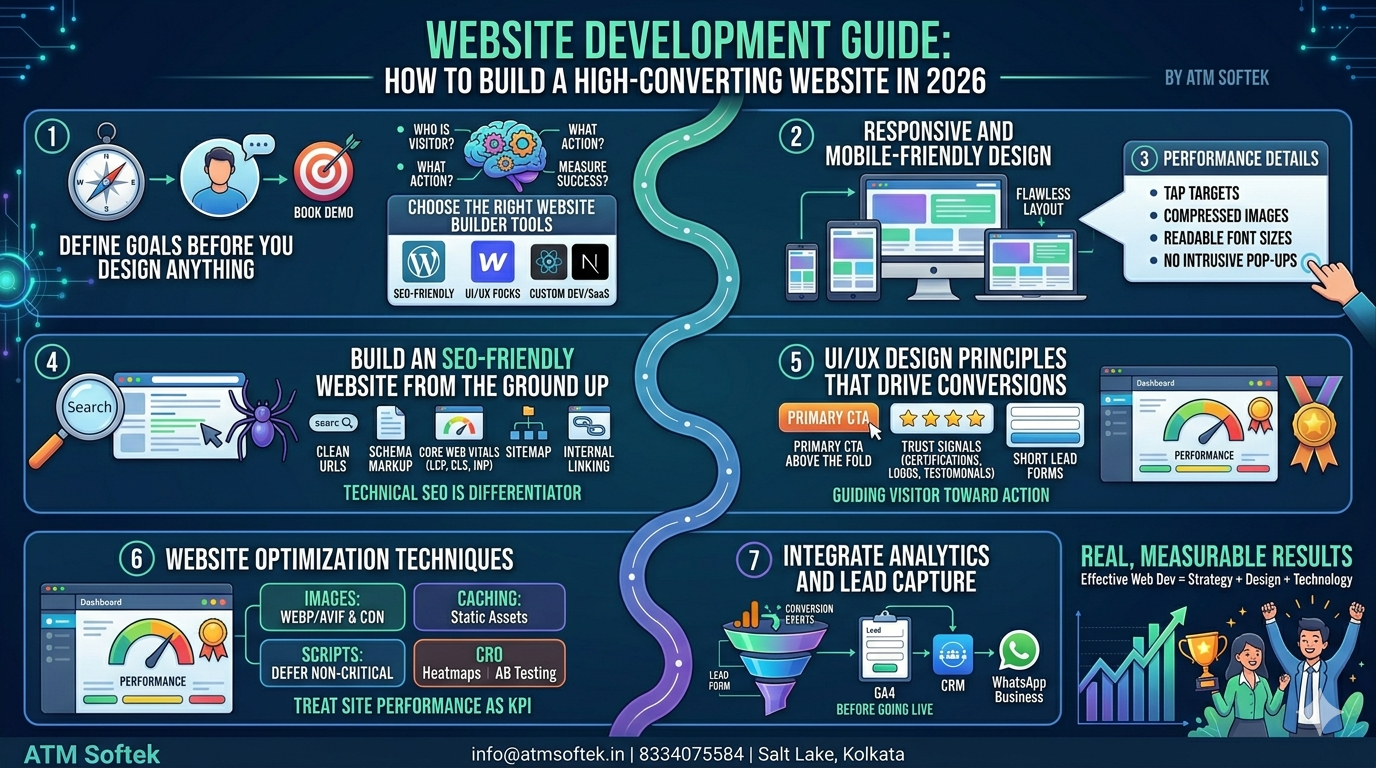
Your website is your most important sales asset. Before a prospect calls you, reads your brochure, or clicks your ad — they judge your website. This guide cuts through the noise and gives you a practical, step-by-step blueprint for website development in 2026.
Search engines now rank on experience, not just content. A slow, cluttered, or mobile-unfriendly website costs you both traffic and leads — regardless of how good your service actually is.
Three hard facts every business owner should know:
The most expensive mistake in website development is building before planning. Answer these three questions first:
For a healthcare software company, the answers might be: clinic managers, book a demo, and track lead form submissions. These answers dictate your layout, copy, and CTA placement — not personal preference.
Your tech stack should match your business complexity and growth plans — not just what looks easy today.
Best for SEO-friendly websites with rich content structures. Highly flexible and supported by a vast plugin ecosystem. Ideal for businesses that need blogging, lead capture, and integrations.
Strong for teams prioritising UI/UX design for websites without heavy developer dependency. Clean output code supports good Core Web Vitals scores.
Necessary for SaaS platforms, web apps, or highly interactive tools where no-code solutions fall short. Higher investment, but total control over performance and functionality.
Whichever platform you choose, confirm it supports fast load times, clean URL structures, and third-party integrations like CRMs and analytics tools.
Responsive website design is not a feature — it is the baseline. Your layout, images, and navigation must adapt seamlessly across every screen size.
Practical tip: Test every page on at least three screen widths during development. Prioritise your homepage, service pages, and lead capture pages — these carry the highest conversion value.
SEO cannot be added after launch. An SEO-friendly website is architected from day one with foundations search engines can crawl, understand, and rank.
For competitive sectors like healthcare IT or enterprise software, technical SEO is often the ranking differentiator — not content volume.
Great UI/UX design for websites is not about aesthetics. It is about guiding the right visitor toward the right action with the least friction.
For B2B businesses, your website design must project reliability and authority. Healthcare decision-makers and procurement managers are evaluating whether they can trust you with critical operations before they ever contact you.
A fast website on launch day can degrade over time. Apply these website optimization techniques on a recurring schedule — not just once.
Run monthly audits with Google PageSpeed Insights and track Core Web Vitals in Google Search Console. Treat site performance as a KPI.
A website that generates traffic but cannot capture leads is a wasted investment. Before going live, ensure the following are in place:
Effective website development in 2026 is the intersection of strategy, design, and technology. A beautiful site that loads slowly will be outranked. A fast site with poor UX will lose visitors before they convert. Get all three right — and your website becomes your best-performing business asset.
Apply these business website solutions to your next build or redesign, and you will have a foundation that generates real, measurable results.
| Q: How long does it take to create a website in 2026? |
| A: A simple business website typically takes 4–8 weeks from planning to launch. Custom web applications or enterprise platforms with complex functionality can take 3–6 months. The planning and content phases are usually what extend timelines most. |
| Q: What is the difference between website design and website development? |
| A: Website design refers to the visual and UX layer — layout, colours, typography, and user flow. Website development is the technical build — coding, database setup, CMS configuration, and integrations. Both must work together for a high-performing site. |
| Q: Do I really need a mobile-friendly website if my audience is mostly desktop users? |
| A: Yes. Google indexes the mobile version of your site first regardless of your audience split. A poor mobile experience can suppress your rankings for all users, including desktop. It also signals poor technical hygiene to search engines. |
| Q: Which website builder tools are best for an SEO-friendly website? |
| A: WordPress remains the gold standard for SEO-friendly websites due to its flexible URL structures, plugin ecosystem (Yoast, Rank Math), and clean heading hierarchy. Webflow is a strong alternative. Avoid drag-and-drop builders that generate bloated code or restrict meta tag control. |
| Q: How often should website optimization techniques be applied? |
| A: Core Web Vitals and speed should be reviewed monthly. Content and on-page SEO quarterly. Full technical audits every six months. Treat your website like a product — it requires ongoing maintenance to stay competitive. |
Need a high-converting website built for your business?
info@atmsoftek.in | 8334075584 / 9830654250 | Salt Lake Sector V, Kolkata 700091

Our business solutions and services help accelerate innovation, increase productivity, reduce costs, and optimize asset utilization.
Copyright @. ATM Softek Private Limited. All Rights Reserved By ATM Softek Private Limited.